



Kisan Hisab · Account & Cloud Sync status
Your account, and what Cloud Sync is doing
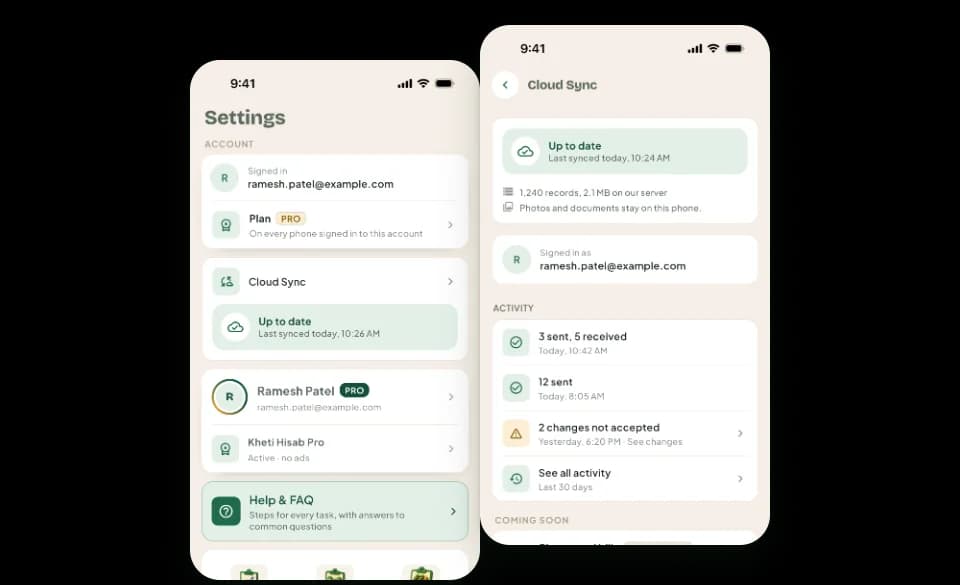
The Account card in Settings shows whether you are signed in, and how. Signing in is free and optional. When Cloud Sync is on, its card shows in plain words whether your book is up to date, what changed lately and how much is kept in the cloud.
The problem it solves
- You do not know whether your book is safe in the cloud right now.
- After a bad signal, you cannot tell whether your changes went up.
- You want to sign in, or sign out, from one place and know what it does.
How it works in Kisan Hisab
- Open “More” and look at the Account card near the top of Settings. It says “Not signed in”, with a “Sign in” button.
- Sign in with Google, or with Apple on an iPhone. Signing in alone uploads nothing, and the app keeps working without it.
- When Cloud Sync is on, its card below shows one line: up to date, waiting, paused, or could not sync, each with what to do next.
- Tap the card to open the Cloud Sync screen: the status of each book, its recent activity and how much of it is in the cloud.
- To sign out, tap “Sign out” at the bottom of Settings.
What you can keep
Account
The name or email you signed in with, the method, and whether your account has Pro. A Pro plan follows the account to another phone on the same store.
Status
Up to date with the last synced time, changes waiting, waiting for internet, paused with its reason, or could not sync. When something is wrong, changes are kept on this phone.
Activity
The last syncs: when each ran, how many changes went up and came down, and any problem in words. The full log covers the last 30 days and stays on this phone.
Size
How many records of your book are on our server, and how much space they take. It is information only, with no limit shown.
How it works with the rest of the app
Common questions
Do I need to sign in?
No. The app works fully without an account, and your records stay on your phone.
Signing in lets your Pro plan follow you to another phone, and lets “Cloud Sync” keep a copy of your book.
To sign in, open “More” and tap “Sign in”, just under your profile. To sign out, tap “Sign out” at the bottom.
With “Cloud Sync” on, signing out pauses sync for the books on your phone until you sign in again. Nothing is deleted, and changes not yet sent wait for the same account.
Does signing in cost anything?
No. Signing in and the Account are free for everyone. Syncing a book with Cloud Sync is part of Pro.
Who can see the Cloud Sync activity log?
Only you. The log is kept on this phone for 30 days. It is not synced, not part of a backup and never sent anywhere.
What happens to Cloud Sync when my Pro ends?
Cloud Sync runs until the paid time ends, then pauses by itself. You are told before that day.
- Nothing on your phone is deleted, and the app keeps working offline.
- Changes you make wait on your phone, and the copy on our server is kept.
- Tap “Renew Pro” or buy Pro again, and sync carries on in the same book from where it stopped.