



Kisan Hisab · Several books
Several farm books on one phone
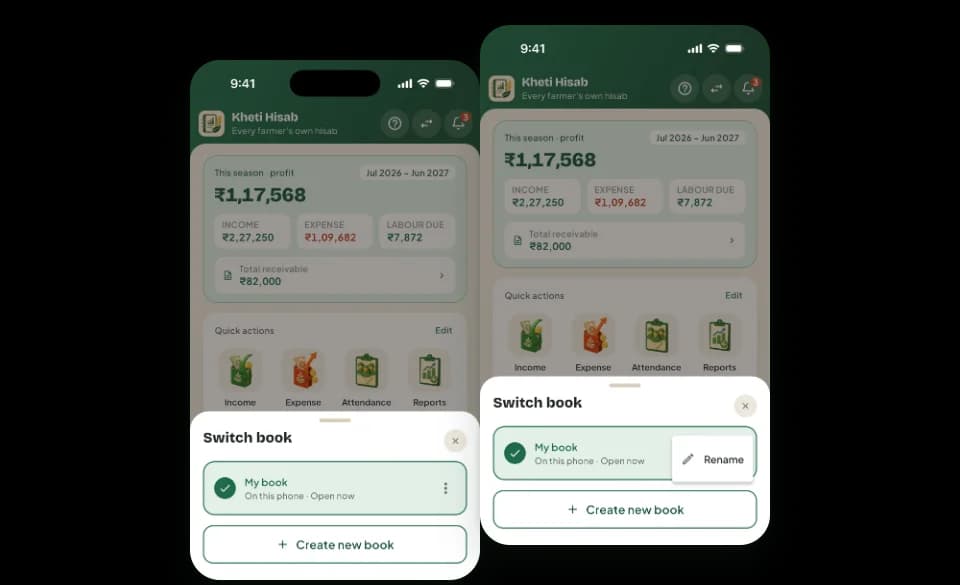
Several books lets one phone keep more than one farm book and switch between them from the Home screen. Each book keeps its own records, and opening another book changes nothing in the one you left.
The problem it solves
- Some records need a book of their own, and putting them in the same book would mix the totals.
- A book kept in the cloud has to come down onto a phone that already has a book, without replacing it.
- Changing from one set of records to another should never risk the one you leave.
How it works in Kisan Hisab
- Tap “Switch book” in the Home header to see your books. The book open now is ticked at the top.
- Tap another book to open it. The app checks the book first: if it cannot be opened, you stay in the book you were in, with nothing lost.
- To start a fresh book, tap “Create new book” and give it a name. It opens empty, with your currency, farming year and units already set.
- To rename a book, open its menu and choose rename. A book with no name of its own is called “My book”.
- A book kept in your Cloud Sync account that is not on this phone yet shows “In your cloud · tap to add it here”. Adding it never replaces another book.
What you can keep
Your books
The book open now, and the others on this phone, each with its state: Synced, Syncing, Waiting for internet, Sync paused or On this phone.
What stays with each book
Currency, farming year, units, contract farming and farms are kept per book. Language, theme and backup settings belong to the phone.
Reminders and backups
Only the open book sends reminders. Google Drive backup backs up the open book, and each book’s backups are kept apart from the others.
Erasing one book
Erasing one book of several opens another book on the phone, so you are never left on an empty screen.
How it works with the rest of the app
Common questions
How do I switch to another book?
Tap “Switch book” in the Home header, then tap the book you want. The app checks it first, then opens it and tells you which book you are in.
How do I start a new book?
In the Switch book list, tap “Create new book” and give it a name. It opens empty, with the open book’s currency, farming year and units, so first-time setup does not run again.
Is anything lost when I switch books?
No. Each book keeps its own records. If a book cannot be opened, you stay in the book you were in, and nothing changes.
Where are my records kept?
Your records are saved on your phone.
When “Cloud Sync” is on, a copy of the book is also kept on our server, so it can come back on a new phone.
Without a backup or “Cloud Sync”, if the phone is lost or the app is removed, the records cannot be brought back. Please make a backup: see the backup questions below.