



Kisan Hisab · Crop-wise profit
Crop-wise accounting and crop profit
In Kisan Hisab every crop season keeps its own sales and expenses, so you can see what each crop earned. A crop’s profit is its sales minus its expenses, plus any contract money already received.
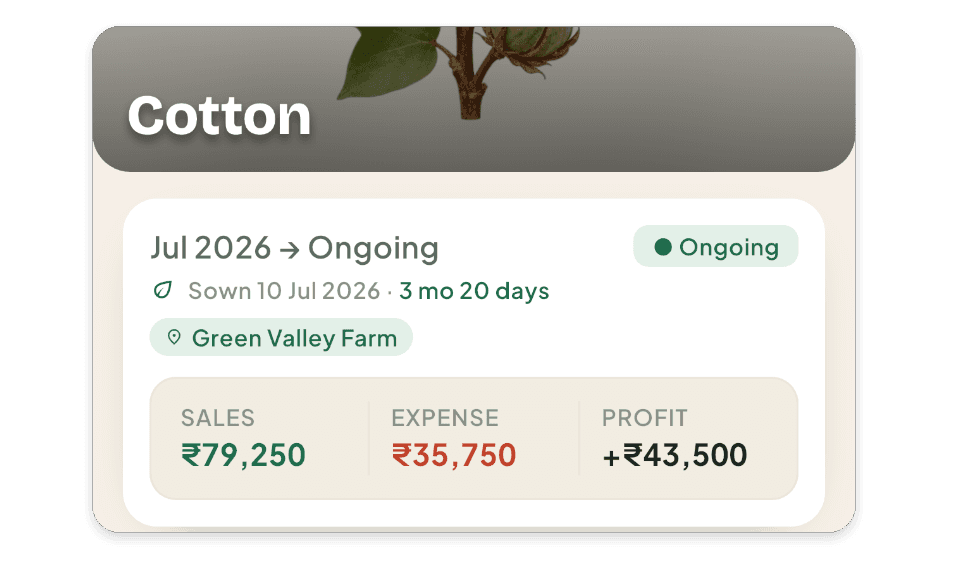
The problem it solves
- All the season’s money is in one notebook, so you cannot tell whether cotton paid better than groundnut.
- Last year’s figures are lost, so there is nothing to compare this season with.
- A crop on one farm and the same crop on another get mixed up.
How it works in Kisan Hisab
- On “Home”, tap “View all” under your crops, then “Start a crop season”: choose the crop, the farm and the start date.
- Record each sale and expense under that crop.
- Open the crop to see its sales, expenses and profit so far.
- When the season is over, finish it and note the final harvest. It can be opened again if you need to.
- Next year, start the same crop again: each season keeps its own profit, so you can compare years.
What you can keep
Crop seasons
One sowing of one crop on one farm, from over a hundred crops in nine groups, or a crop of your own.
Farms and plots
Each farm, its plots and their areas, with profit farm by farm.
Profit per crop and per farm
Sales minus expenses, with contract money counted once it is received. Money still to come is shown apart, not counted.
Seven reports
Income vs expense, crop profitability, farm-wise profit, expense by category, money owed, contract receivables, and contract vs open market. All free.
PDF to share
Any report as a PDF in the app’s language, previewed first and shared only when you choose.
How it works with the rest of the app
Common questions
How do I add a crop?
- On “Home”, under “Active crops”, tap “View all”.
- Tap “Start a crop season” at the bottom.
- Tap your crop. If it is not in the list, tap “Add custom crop”.
- Choose the farm, set the “Start date”, and tap “Save”.
- You need at least one farm first.
- The start date cannot be in the future.
What is a crop season?
One sowing of one crop on one farm, from start to finish. Cotton this year and cotton next year are two seasons.
Each season has its own income, expense and profit, so you can compare years.
“CURRENT” shows crops still growing. “PAST” shows the ones you closed.
My crop is over. How do I close it, or open it again?
- Open the crop and tap “Finish season” at the top right.
- Set the “End date” if needed and tap “Close season”.
Nothing is deleted, and money still pending stays pending. The crop moves under “PAST”.
To open it again: tap the three-dot button and choose “Reopen this season”.
How do I start the same crop again next year?
- Open “More” > “Crops”.
- Tap the crop, then “Start new season”.
- Choose the farm and date and tap “Save”.
Each season keeps its own entries and its own profit.
My crop is not in the list. How do I add my own?
- Open “More” > “Crops”.
- Tap “Add” at the top right.
- Type the name, choose a category, and tap “Save”.
A crop you added can be deleted only while nothing uses it. Once it has a season, the app offers “Archive” instead, so that season is not left without a crop.
How do I add or change a farm?
- Open “More” > “Farms”.
- To add: tap “Add farm”, type the “Farm name”, and tap “Save farm”.
- To change: tap the farm, then the pencil at the top right.
How do I make a report and share it?
- Open “More” > “Reports” and tap a report.
- Tap the filter button at the top right to choose the period, crop or farm.
- Tap “Export PDF”, then “Share”.
To print, share the PDF to a printer app. All reports are free.