



Kisan Hisab · Reports & PDF
Farm reports you can share as a PDF
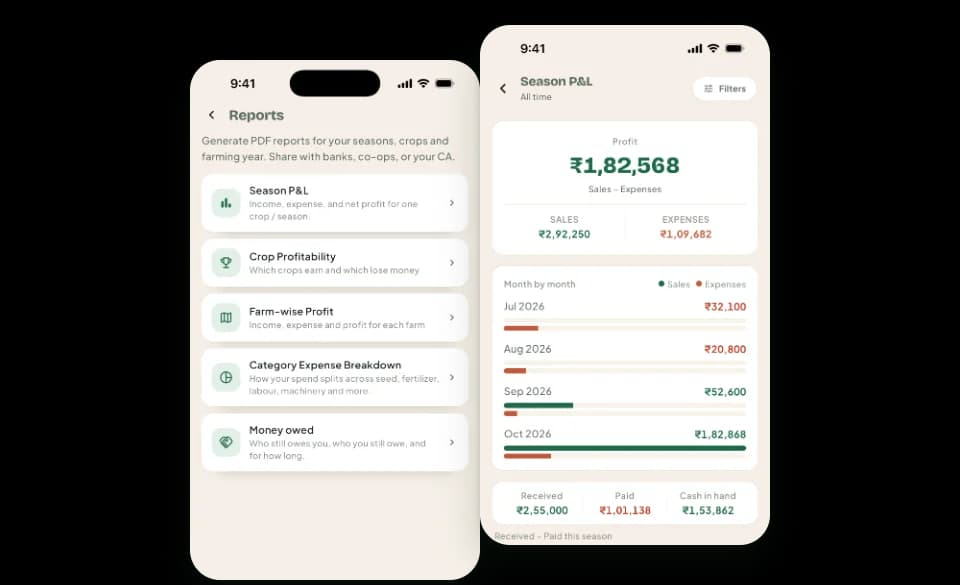
Kisan Hisab turns your entries into seven free reports: income against expense, crop-wise profit, farm-wise profit, expenses by category, money owed, contract receivables and contract against open market. Choose the period, then share any report as a PDF.
The problem it solves
- At the end of a season you cannot say which crop made the money and which did not.
- A bank, a family member or an adviser asks for your accounts, and there is only a notebook.
- Totals worked out by hand are slow, and one mistake spoils the lot.
How it works in Kisan Hisab
- Open “More” > “Reports” and tap a report.
- Tap the filter button at the top right to choose the period, the crop or the farm.
- Read the report on screen, with its totals and charts.
- Tap “Export PDF”, then “Share”. To print, share the PDF to a printer app.
What you can keep
Farm-book reports
Income against expense, crop profitability, farm-wise profit, expense by category and money owed, all made from your entries.
Contract reports
Contract receivables, and contract against open market. Contract money is kept apart from your farm-book reports, so nothing is counted twice.
Filters
The period, the crop or the farm, so one report can show a season, a crop or a single farm.
PDF
Any report as a PDF you can preview, share or print. It is written in your language, in the script you read.
How it works with the rest of the app
Common questions
Which reports are there?
Seven: income against expense, crop profitability, farm-wise profit, expense by category, money owed, contract receivables, and contract against open market.
How do I make a report and share it?
- Open “More” > “Reports” and tap a report.
- Tap the filter button at the top right to choose the period, crop or farm.
- Tap “Export PDF”, then “Share”.
To print, share the PDF to a printer app. All reports are free.
Why is contract money shown apart from my other income?
Most contract money has been promised but not yet received. If it were added to your farm income, your profit would look bigger than the money you have.
So only contract money you have actually received counts in a crop's profit. What is still to come is shown on the contract.
What do I get with Pro, and what stays free?
Free for everyone: entries, crops, parties, attendance, contracts, all reports and backup.
Pro adds: adding new farm activities, reminders, choosing how many backups are kept, and Cloud Sync.
Records you already have are never locked.