



Kisan Hisab · Farm activities
Farm activity records
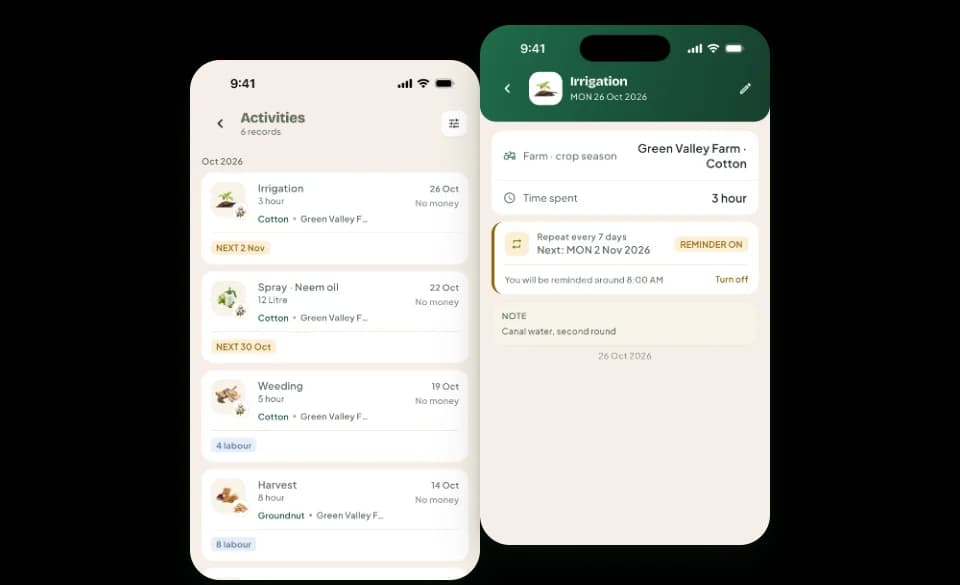
Activities record what happened on the farm, while expenses record the money related to it. In Kisan Hisab you note the work, such as a spray, an irrigation or a weeding, against the crop and the date, and can link it to the expense it caused.
The problem it solves
- You cannot remember when the last spray was done, or with what.
- Irrigation turns and fertiliser doses are kept in memory, not on paper.
- The money spent on a spray is in the notebook, but the spray itself is not.
How it works in Kisan Hisab
- Add an activity on a crop: choose the work, such as Spray, Irrigation, Fertiliser or Weeding, and the date.
- Add what you like: the product and quantity, how long it took, how many labourers, the party, the weather or a note.
- If the work cost money, link the expense you recorded for it, so the two stay together.
- Set when the work is next due to get a reminder the evening before and on the morning of the day. Repeat a past activity in one tap.
What you can keep
Kinds of work
Soil preparation, sowing, transplanting, irrigation, fertiliser, spray, weeding, pruning, field check, harvest, threshing, storage, labour work and other work.
Details of the work
Product, quantity, duration, number of labourers, party, weather and a note.
The money, apart
An activity holds no amount; it can link the expense that paid for it.
Next due and reminders
When the work is due again, with a reminder on your phone.
How it works with the rest of the app
Common questions
Are farm activities free?
Adding a new activity, repeating one and turning its reminder on are part of Pro.
Activities you already have can always be seen, changed and deleted, with or without Pro.
What is the difference between an activity and an expense?
An activity records the work done on the farm, such as a spray or an irrigation. An expense records the money.
An activity has no amount. If the work cost money, record the expense and link it to the activity.
How do reminders and the bell work?
The bell at the top of “Home” lists money that is due and work that is due.
To get reminders on your phone: open “More” and turn on “Reminders”. Turning it on needs Pro. Turning it off is always free.
What do I get with Pro, and what stays free?
Free for everyone: entries, crops, parties, attendance, contracts, all reports and backup.
Pro adds: adding new farm activities, reminders, choosing how many backups are kept, and Cloud Sync.
Records you already have are never locked.