



Kisan Hisab · Contract farming
Contract farming records and payments
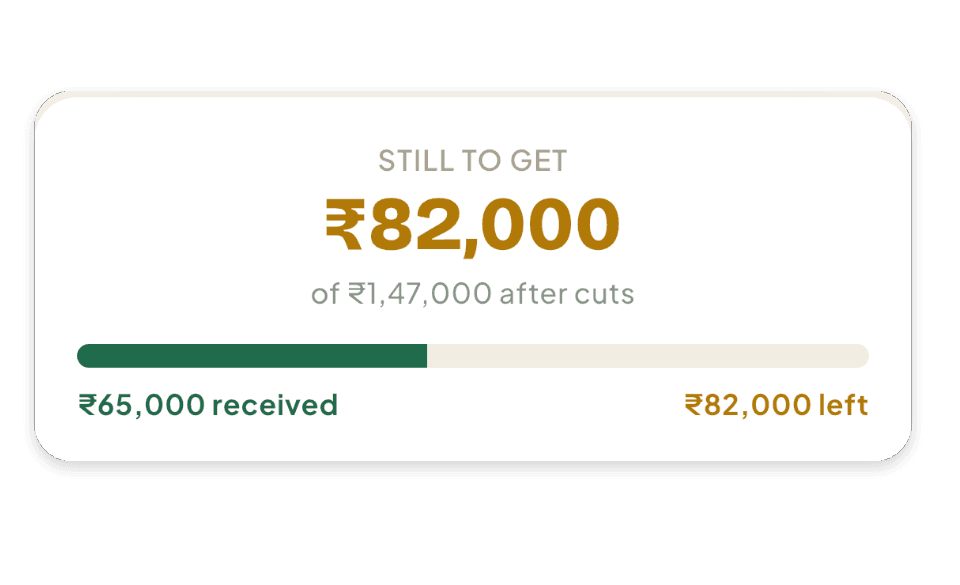
For a crop sold to a buyer or company on contract, Kisan Hisab keeps the contract: its value, the cuts, the advance, the instalments, the payments received and what is still to come. Contract money is kept apart from your other farm income, so nothing is counted twice.
The problem it solves
- The advance, the instalments and the final payment come months apart, and the balance is hard to follow.
- The buyer cuts commission, grading or transport, and the amount agreed is not the amount paid.
- Contract money gets added to the farm notebook as if it were another sale, and the season’s totals go wrong.
How it works in Kisan Hisab
- Turn on “Contract farming” in “More”: it is off until you need it, and a “Contracts” tab appears.
- Add a contract with the buyer or company: what it covers (trees, area, the full crop or a lump sum) and how it is priced.
- Add the cuts, such as commission, grading, transport or packing, and the payment plan: in full, an advance with instalments, or as it comes.
- Record each payment and each harvest lot as it happens. The contract shows what has been received and what is still to come.
- Complete, cancel or renew the contract when it ends.
What you can keep
The contract
Buyer or company, crop and farm, what it covers, and the price: fixed, per tree, per area, per quantity or harvest-wise.
Cuts
Commission, grading, transport and packing, taken off the value. An advance is never treated as a cut.
Advance and instalments
The advance and each instalment, as an amount or a share, with due dates.
Payments and balance
Every payment received, and what is still to receive: the value after cuts, less what has come in.
Harvest lots
Each lot delivered, by quantity.
How it works with the rest of the app
Common questions
What is contract farming, and how do I turn it on?
Use it when a trader agrees in advance to buy your crop, and pays in parts.
- Open “More”.
- Under “FEATURES”, turn on “Contract farming”.
A “Contracts” tab appears. Turning it off later deletes nothing.
How do I add a contract?
- Open “Contracts” and tap the plus button.
- Choose the trader, the crop and the farm.
- Go through the steps: what is included, the cuts, and how you will be paid.
- On the last step, tap “Create contract”.
How do I record money or a harvest on a contract?
- Open the contract.
- For money: tap “Receive payment”, choose the kind, enter the amount, and tap “Save payment”.
- For a harvest: open “Harvests”, then “Add harvest”.
A harvest records the date and quantity only. It is not money.
How do I finish, cancel or remove a contract?
- Open the contract and tap the three-dot button at the top right.
- Choose “Mark it complete” or “Cancel the contract”.
- To put it away, choose “Archive”.
A contract can be deleted only after it is archived.
Deleting removes its payments, cuts and harvests for good.
Why is contract money shown apart from my other income?
Most contract money has been promised but not yet received. If it were added to your farm income, your profit would look bigger than the money you have.
So only contract money you have actually received counts in a crop's profit. What is still to come is shown on the contract.